✅UAT PRO 12th Anniversary Offer
✅ Buy for 1 Year New Account and Get 1 Year Free - Total 2 Years
✅ Renew Old Account for 1 Year and Get 6 Months Free - Total 18 Months
✅OFFER VALID UNTIL 10th September 2026
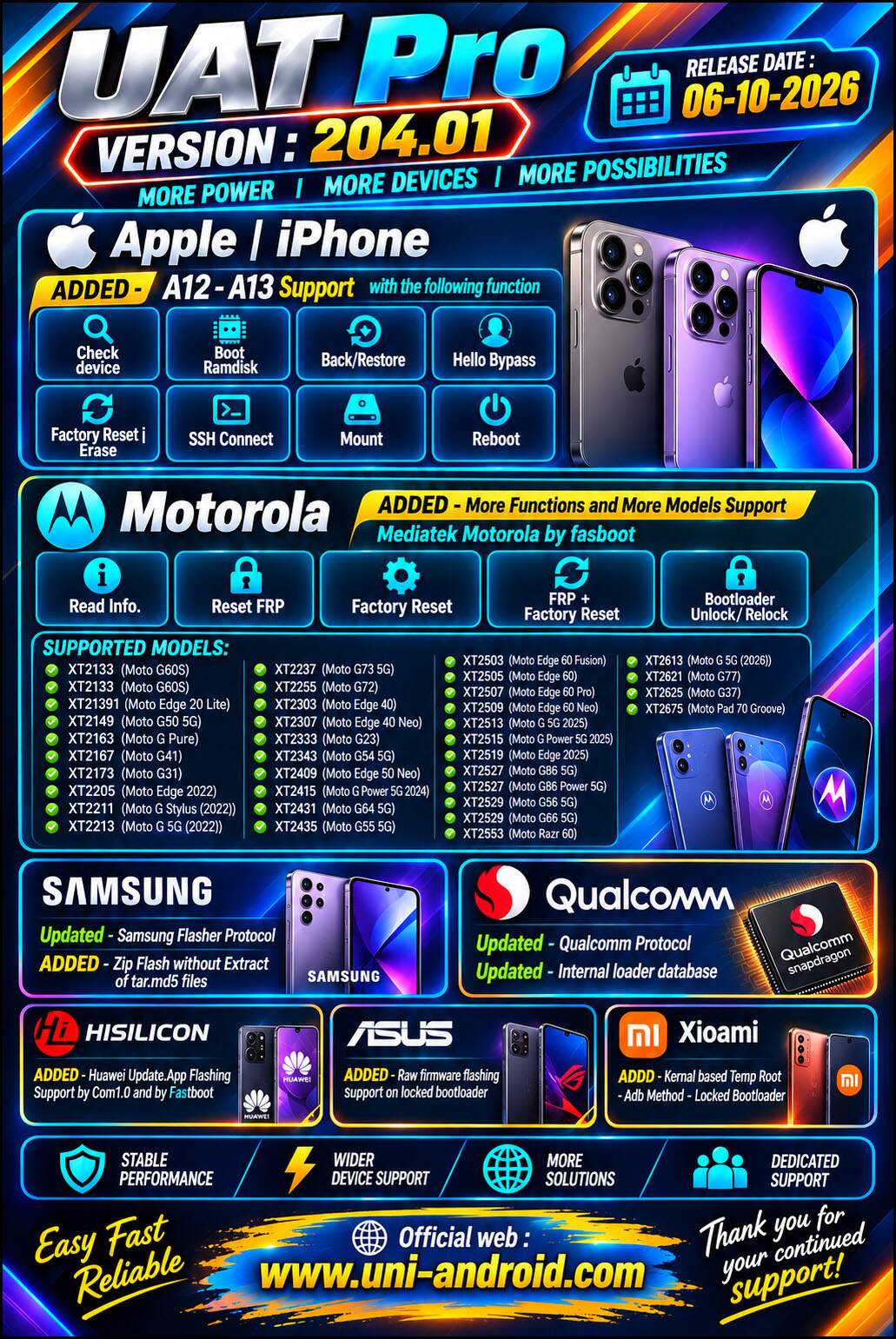
UAT PRO Version : 203.01 Release Notes: ➡️ MOTOROLA - MediaTek 👍 ADDED - Motorola MediaTek fastboot Support 🎷Reset FRP 🎷Bootloader unlock 🎷Read Device Info. [Extended] 👍 SUPPORTED MODELS : - XT2205 (Moto Edge 2022) - MT6879 Mediatek Dimensity 1050
- XT2237 (Moto G73 5G) - MT6855 Mediatek Dimensity 930
- XT2255 (Moto G72) - MT6789 Mediatek Helio G99
- XT2307 (Moto Edge 40 Neo) - MT6878 Mediatek Dimensity 7030
- XT2343 (Moto G54 5G) - MT6855 Mediatek Dimensity 7020
- XT2409 (Moto Edge 50 Neo) - MT6878 Mediatek Dimensity 7300
- XT2415 (Moto G Power 5G 2024) - MT6855 Mediatek Dimensity 7020
- XT2431 (Moto G64 5G) - MT6855 Mediatek Dimensity 7025
- XT2435 (Moto G55 5G) - MT6855 Mediatek Dimensity 7025
- XT2453 (Moto Razr 50) - MT6878 Mediatek Dimensity 7300X
- XT2503 (Moto Edge 60 Fusion) - MT6878 Mediatek Dimensity 7400
- XT2505 (Moto Edge 60) - MT6878 Mediatek Dimensity 7300
- XT2507 (Moto Edge 60 Pro) - MT6897 Mediatek Dimensity 8350
- XT2509 (Moto Edge 60 Neo) - MT6878 Mediatek Dimensity 7400
- XT2513 (Moto G 5G 2025) - MT6835 Mediatek Dimensity 6300
- XT2515 (Moto G Power 5G 2025) - MT6835 Mediatek Dimensity 6300
- XT2519 (Moto Edge 2025) - MT6878 Mediatek Dimensity 7400
- XT2527 (Moto G86 5G) - MT6878 Mediatek Dimensity 7300
- XT2527 (Moto G86 Power 5G) - MT6878 Mediatek Dimensity 7300
- XT2529 (Moto G56 5G) - MT6879 Mediatek Dimensity 7060
- XT2529 (Moto G66j 5G) - MT6879 Mediatek Dimensity 7060
- XT2553 (Moto Razr 60) - MT6878 Mediatek Dimensity 7400X
Xiaomi - Mediatek ADDED - Bootloader Unlock - ADB Method 👍 SUPPORTED MODELS : - POCO C65 (gale) - MT6769Z Mediatek Helio G85
- POCO C65 (gust) - MT6769Z Mediatek Helio G85
- POCO C75 (pond) - MT6769 Mediatek Helio G81
- POCO C85 (dew) - MT6769 Mediatek Helio G81
- POCO M6 Pro (emerald) - MT6789 Mediatek Helio G99
- POCO X6 Pro 5G (duchamp) - MT6897 Mediatek Dimensity 8300
- POCO X7 Pro (rodin) - MT6897 Mediatek Dimensity 8400
- Redmi 13C (gale) - MT6769Z Mediatek Helio G85
- Redmi 13C (gust) - MT6769Z Mediatek Helio G85
- Redmi 13X (moon) - MT6769 Mediatek Helio G91
- Redmi 13X (tides) - MT6769 Mediatek Helio G91
- Redmi 14C (pond) - MT6769 Mediatek Helio G81
- Redmi 15C (dew) - MT6769 Mediatek Helio G81
- Redmi A3 (blue) - MT6765 Mediatek Helio G36
- Redmi A3 Pro (pond) - MT6769 Mediatek Helio G81
- Redmi K80 Ultra (dali) - MT6991 Mediatek Dimensity 9400+
- Redmi Note 13 Pro 4G (emerald) - MT6789 Mediatek Helio G99
- Redmi Note 14 4G (tanzanite) - MT6789 Mediatek Helio G99
- Redmi Note 14 Pro 4G (obsidian) - MT6789 Mediatek Helio G100
- Redmi Note 15 Pro (lapis) - MT6878 Mediatek Dimensity 7400
- Xiaomi Redmi K70E (duchamp) - MT6897 Mediatek Dimensity 8300
Xiaomi - Qualcomm ADDED - Reset FRP | factory Reset | Read / Write firmware by EDL mode 👍 SUPPORTED MODELS : - MIX Flip (ruyi) - SM8650-AB Snapdragon 8 Gen 3
- POCO F6 Pro (vermeer) - SM8550-AB Snapdragon 8 Gen 2
- POCO F7 Ultra (miro) - SM8750-AB Snapdragon 8 Elite
- POCO F8 Pro (annibale) - SM8750-AB Snapdragon 8 Elite
- POCO F8 Ultra (myron) - SM8850-AC Snapdragon 8 Elite Gen 5
- Redmi K60 Pro (socrates) - SM8550-AB Snapdragon 8 Gen 2
- Redmi K70 (vermeer) - SM8550-AB Snapdragon 8 Gen 2
- Redmi K80 Pro (miro) - SM8750-AB Snapdragon 8 Elite
- Redmi K90 (annibale) - SM8750-AB Snapdragon 8 Elite
- Redmi K90 Pro Max (myron) - SM8850-AC Snapdragon 8 Elite Gen 5
- Redmi K90 Ultra (warsaw) - SM8750-AB Snapdragon 8 Elite
- Xiaomi 13 (fuxi) - SM8550-AB Snapdragon 8 Gen 2
- Xiaomi 13 Pro (nuwa) - SM8550-AB Snapdragon 8 Gen 2
- Xiaomi 13 Ultra (ishtar) - SM8550-AB Snapdragon 8 Gen 2
- Xiaomi 15 (dada) - SM8750-AB Snapdragon 8 Elite
- Xiaomi 15 Pro (haotian) - SM8750-AB Snapdragon 8 Elite
- Xiaomi 15 Ultra (xuanyuan) - SM8750-AB Snapdragon 8 Elite
- Xiaomi Mi Mix Fold 3 (babylon) - SM8550-AB Snapdragon 8 Gen 2
- Xiaomi Mix Flip 2 (bixi) - SM8750-AB Snapdragon 8 Elite
- Xiaomi Pad 6S Pro (sheng) - SM8550-AB Snapdragon 8 Gen 2
- Xiaomi Pad 8 Pro (piano) - SM8750-AB Snapdragon 8 Elite
ADDED - Xiaomi Temp Root - Without bootloader Unlock - ADB Method Requires Android 16 + Kernel 6.12.x UPDATED - Qualcomm Protocol
FIXED - Some reported Bugs